A practical, step-by-step guide to creating a website that attracts customers and drives sales
You don't need to know how to code. You don't need to understand servers or CSS. You don't need to become a web designer.
What you need: Clarity about what your website should accomplish, smart decisions about how to build it, and confidence to avoid expensive mistakes.
The secret: Decide what it should say and what it should look like BEFORE you hire anyone.
When you can show a designer examples and hand them clear copy, the process becomes faster, cheaper, and less painful.
This guide summary will help you figure that out.
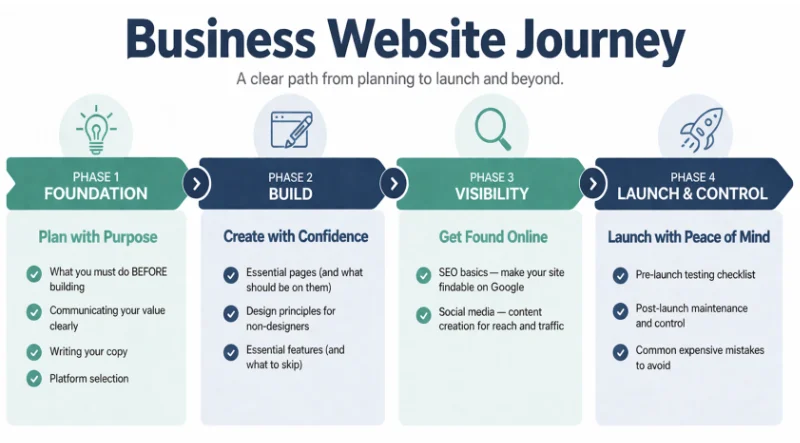
Not every business needs a website immediately—but here's why most do, and what yours should accomplish.
Not every business needs a website immediately. But most businesses DO need one, and almost every business will eventually need one.
1. Build trust and credibility. Show testimonials, credentials, professional design.
2. Generate leads. Capture contact info so you can follow up.
3. Sell products directly. Process transactions online with shopping cart and checkout.
4. Provide information. Educate customers and answer questions.
My website's #1 purpose:
My website's #2 purpose:
My website's #3 purpose:
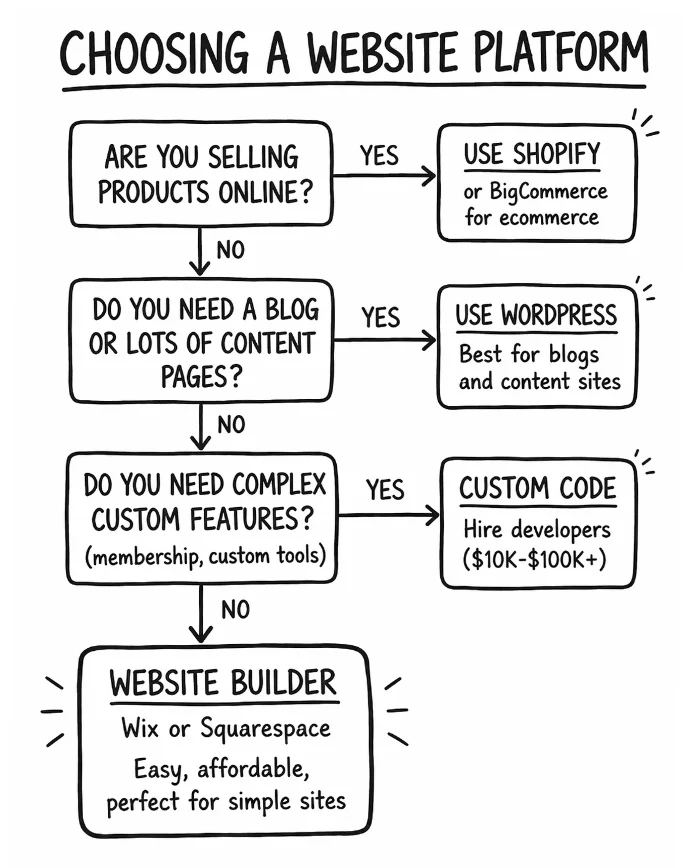
Website builders, WordPress, Shopify, or custom? Here's how to choose based on your needs and budget.
Hosting: This is the server company, like Bluehost, GoDaddy, Wix, etc. It's where to go online to log into your website owner/admin area.
Designer/Developer: This is the person who makes your website design and makes your website work properly. Sometimes it's the same person, sometimes different people do each role.
Your Domain or URL: This is your website address like www.BillsBurgers.com or YummyYogurt.com, etc.
Website Builder software: This is the very common set of online "drag and drop" builder tools that many hosting platforms offer (GoDaddy, Wix, Squarespace, etc). It's designed to allow non-programmers to build their website, with friendly web page building tools.
Website Builders (Wix, Squarespace): Drag-and-drop. Hosting included. Best for simple sites. $16-$65/month. Easy but limited.
WordPress: Extremely flexible. Endless plugins. Requires hosting ($3-$25/month). Steeper learning curve. Best for blogs and content-heavy sites.
Ecommerce Platforms (Shopify, BigCommerce): Built for selling online. Shopping cart, payments, inventory included. $39-$399/month. Best for online stores with 10+ products.
Custom Coded: Hire developers. Complete control. Expensive ($10K-$100K+). Best for complex unique needs. Overkill for most small businesses.
| Platform | Best For | Monthly Cost | Ease of Use |
|---|---|---|---|
| Wix / Squarespace | Simple sites, portfolios | $16-$65 | Very easy |
| WordPress | Blogs, content sites | $3-$25 | Moderate |
| Shopify | Online stores | $39-$399 | Easy |
| Custom Code | Complex needs | $0 + dev costs | Hardest |
My budget: ☐ Low ($0-$500) ☐ Medium ($500-$5K) ☐ High ($5K+)
My technical level: ☐ Beginner ☐ Intermediate ☐ Advanced
My primary purpose: ☐ Information ☐ Blog ☐ Ecommerce ☐ Custom
Best platform for me:
How to choose a memorable domain name and reliable hosting—and why you must own both yourself.
Good domain: Short, memorable, easy to spell, ideally .com
Avoid: Hyphens, numbers, weird extensions (.biz, .info)
Where to register: Namecheap, Google Domains, GoDaddy. Cost: $12-$15/year.
Reliable hosting matters more than cheap hosting. Downtime costs you customers and Google rankings.
Recommended hosts:
Note: If using Wix, Squarespace, or Shopify, hosting is included.
My domain name:
Registered at:
Hosting provider:
The 5 core pages your website needs to build trust and turn visitors into customers.
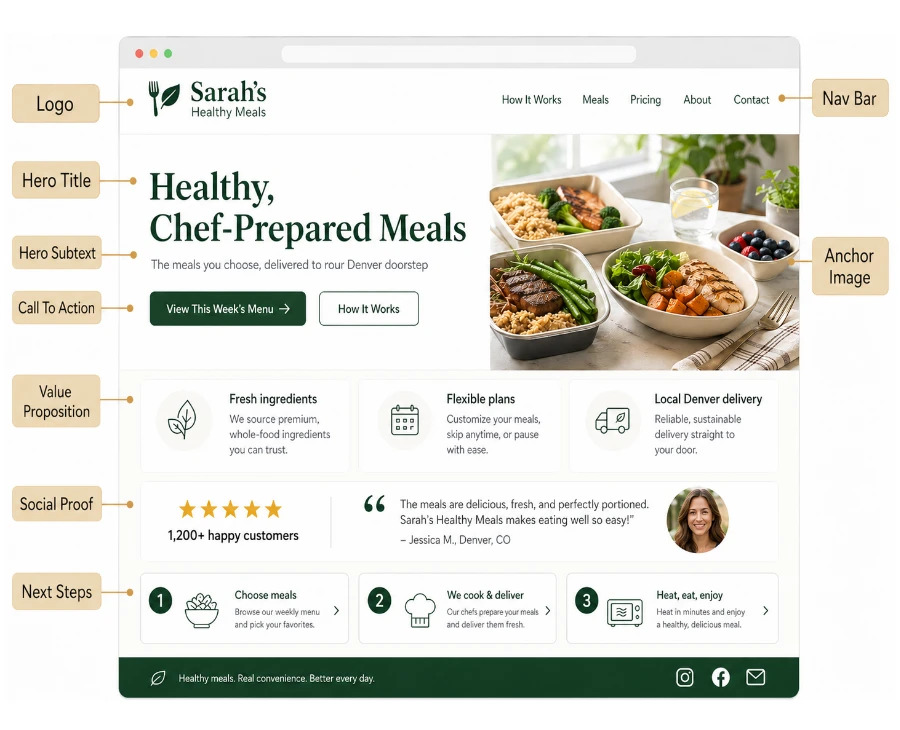
1. Homepage: Clear headline stating what you do and who you serve. Strong call-to-action (CTA). Social proof (testimonials, logos, numbers).
2. About Page: Who you are, why you started, why customers should trust you. Include a photo of yourself or team.
3. Services/Products Page: What you sell, who it's for, what they get. Clear pricing if possible. CTA to buy or inquire.
4. Contact Page: Email, phone, contact form. Address if you have a physical location. Response time expectations.
5. Testimonials/Portfolio: Social proof from real customers. Before/after photos, case studies, reviews.
The proven copywriting formula to grab attention, explain your value, and get people to take action.
Template: [What you do] for [who you serve] to [outcome they want]
Make CTAs clear, specific, and action-oriented.
Simple design principles to make your site look professional—even if you've never designed anything.
1. Use whitespace. Don't cram everything together. Give elements room to breathe.
2. Stick to 2-3 colors. Choose a primary color, secondary color, and neutral (black/gray/white).
3. Use professional fonts. Stick to 1-2 fonts. Use Google Fonts for free options.
4. Use high-quality images. No blurry photos or cheesy stock images. Use your own photos or premium stock (Unsplash, Pexels).
5. Keep it simple. Less is more. Clear hierarchy, easy navigation, minimal distractions.
Mobile responsiveness, site speed, and SSL certificates—the technical basics that affect your rankings and sales.
60%+ of web traffic is mobile. If your site doesn't work on phones, you're losing customers.
Test on multiple devices: iPhone, Android, tablets. Use Google's Mobile-Friendly Test.
Every 1-second delay = 7% fewer conversions.
How to speed up your site:
Test speed: Use Google PageSpeed Insights or GTmetrix.
Required for security and trust. Google ranks HTTPS sites higher. Most hosts include free SSL.
The essential SEO tactics to help customers find you when they search for what you offer.
Unfortunately, SEO will not bring a lot of people to your website automatically. Many founders assume once site is live, the traffic starts. Not true. It's harder than ever to get free Google traffic unfortunately - there's so much competition. But in order to rank with Google at all - you should do all the basic SEO to give your site a chance!
1. Keyword research: What terms do customers search? Use Google Keyword Planner or Ubersuggest.
2. Title tags: Each page needs a unique, keyword-rich title (under 60 characters).
3. Meta descriptions: Brief summary of each page (under 160 characters) with keywords.
4. H1 headings: One per page, includes main keyword.
5. Alt text: Describe images with keywords for accessibility and SEO.
6. Internal linking: Link between your own pages to help Google understand site structure.
Setting up contact forms, payment processing, and other functional features your business needs.
Use: Contact Form 7 (WordPress), built-in forms (Wix/Squarespace), Typeform, or Google Forms.
Test it! People need to be able to contact you. Submit a test form and make sure it arrives in your inbox (check spam folder).
For ecommerce: Shopify handles payments built-in. WordPress needs WooCommerce + Stripe/PayPal.
For services: Use Stripe, PayPal, Square, or invoice software like FreshBooks.
Transaction fees: Typically 2.9% + $0.30 per transaction.
Your pre-launch checklist to test everything, fix issues, and go live with confidence.
Install Google Analytics and track the metrics that tell you what's working and what needs to improve.
Track visitors, page views, traffic sources, bounce rate, and conversions.
Review monthly and make improvements based on data.
You now have a roadmap from "I need a website" to "I have a website that works."
Remember:
Now go build your website.
Want the Full Website Guide?
The full guide covers every step from platform choice to launch day — with checklists, tool comparisons, and real examples.
→ Read the Full Guide (complete deep-dive with worksheets and examples)
Complete guide series available at StartABusiness.Center
© 2026 StartABusiness.Center | All Rights Reserved
